TREX IPTV reseller credits, subscription durations and customer activation cards

Credit-based reseller access

TREX IPTV Reseller Panel

Create and renew customer subscriptions from one practical panel. Choose a credit package for compatible M3U, Xtream Codes and Stalker Portal devices.

Manage customer accounts Track credits and renewals

Reseller credit packages

Choose the Credits That Fit Your Customer Base

Start with 60 credits or choose a larger balance for a lower cost per credit. Every package uses the same TREX reseller panel; only the available credit balance changes.

Prices are listed in EUR. The final package and payment details are confirmed before activation.

Starter balance

60 Credits

€100

Approximately €1.67 per credit

Up to 5 twelve-month customer subscriptions*

Order 60 Credits

Growing reseller

120 Credits

€200

Approximately €1.67 per credit

Up to 10 twelve-month customer subscriptions*

Order 120 Credits
Lowest credit cost

High-volume balance

600 Credits

€915

Approximately €1.53 per credit

Up to 50 twelve-month customer subscriptions*

Order 600 Credits

*Estimate based on 12 credits for one 12-month subscription. Shorter durations deduct fewer credits, so a package can be divided between different subscription lengths.

Included with every package

The same panel access and connection choices

  • Create and renew customer subscriptions
  • M3U, Xtream Codes and Stalker Portal options
  • Track credit balance and account expiry dates
  • Setup guidance for compatible devices and apps
Not sure which balance to choose? Tell us how many customers you expect to activate and which durations you plan to sell.
Contact Sales on WhatsApp

How the reseller system works

Turn Reseller Credits into Customer Subscriptions

Credits are deducted according to the subscription duration you create. Buy one balance, then divide it between monthly, quarterly, six-month and annual customer accounts.

Credit conversion

Choose the Customer Duration

1 month 1 credit
3 months 3 credits
6 months 6 credits
12 months 12 credits

Four-step workflow

From Package Purchase to Renewal

  1. 01
    Choose credits

    Select a balance that matches your expected customer volume.

  2. 02
    Receive panel access

    Use one dashboard to create and monitor customer accounts.

  3. 03
    Create a subscription

    Choose the duration and compatible connection format.

  4. 04
    Manage renewals

    Track expiry dates and renew accounts from your remaining balance.

120

One balance, several ways to sell

Use 120 credits for 120 monthly, 40 three-month, 20 six-month or 10 annual subscriptions—or combine different durations.

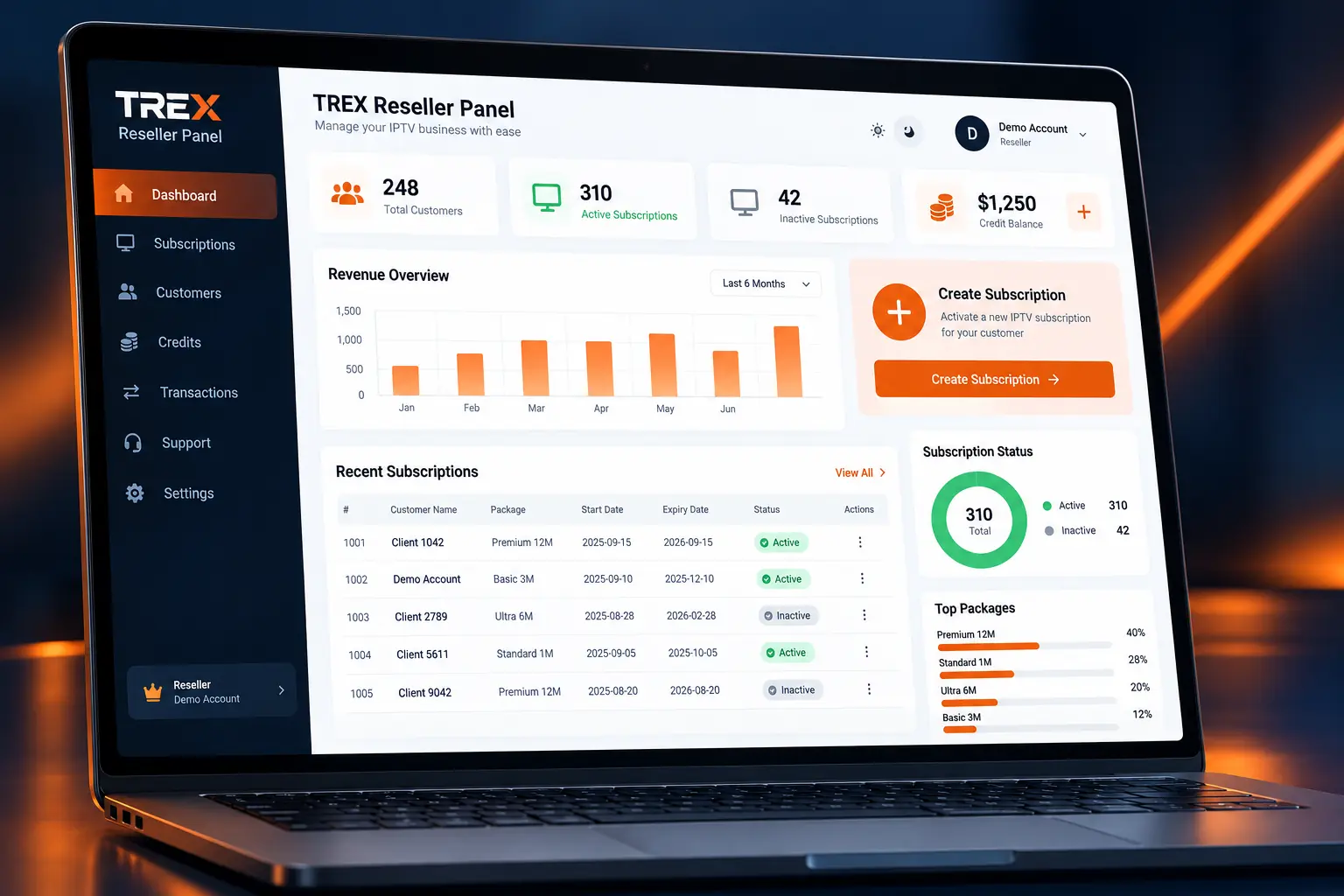
TREX IPTV reseller panel dashboard for managing credits, customer subscriptions and renewals
Credit balanceTrack usage and renewals

Inside the reseller panel

Manage Customer Accounts from One TREX Reseller Dashboard

Create customer subscriptions, monitor your available credits and organise upcoming renewals without switching between separate management tools.

Create Subscriptions

Select the customer’s duration and supported connection format.

Manage Active Accounts

Review activation status, subscription details and expiry dates.

Process Renewals

Extend existing customer subscriptions using your panel balance.

Track Credit Usage

See the remaining balance after new accounts and renewals.

Organise Customer Access

Keep subscription records easier to locate and manage.

Use Compatible Formats

Create access for M3U, Xtream Codes or Stalker Portal devices.

Local TREX reseller managing website orders and customer enquiries online
TREX reseller meeting customers and explaining device compatibility
TREX reseller monitoring customer accounts, renewals and service status
TREX reseller completing a secure customer payment and providing a receipt
3 Sales Models Shop · Direct · Website

Build your reseller business

Choose How You Will Find and Support Your Customers

A reseller can work through a local shop, sell directly to customers or manage orders through a website. Choose one model first, document the process and add more sales channels when customer support remains manageable.

01

Shop-Based Selling

Explain device compatibility in person, collect the required setup details and help customers install their preferred application.

02

Direct Local Sales

Use referrals, permitted community promotion and one-to-one consultations to reach customers who want local support.

03

Website-Led Orders

Publish clear packages, collect device information through the order form and use WhatsApp for questions that need personal assistance.

Decide Your Customer-Facing Brand

Sell with the TREX identity where authorised, or build your own website, support name and setup materials around the service. Consistent branding and better local support can justify stronger pricing, but application, panel or infrastructure rebranding depends on the permissions included with your package.

Test Before You Support Customers

Try the service yourself on a Smart TV, Fire TV or Android device and learn several compatible applications. Customers will arrive with different devices, apps and connection formats, so practical setup knowledge reduces delays and repeat questions.

A familiar offer for cable customers. People already understand recurring television access and local support. Make the comparison around device flexibility, guided setup and responsive service—not unverified channel counts, guaranteed savings or unsupported content claims.

CUSTOMER ONBOARDING

From First Enquiry to Customer Renewal

Use a simple, repeatable process to check compatibility, activate the right connection format and give every customer clearer setup support.

01

Collect Details

Ask for the customer’s device, preferred app, connection type and required duration.

02

Confirm Compatibility

Match the device and player with M3U, Xtream Codes or Stalker Portal access.

03

Run the Free Trial

Configure the customer’s real device and chosen app before using credits for a paid term.

04

Activate Paid Access

After confirmation, extend the trial account where supported or create the paid duration.

05

Deliver the Setup

Send access details, the correct setup guide and a clear activation confirmation.

06

Track the Renewal

Record the expiry date and contact the customer before their access ends.

BEFORE ACTIVATION

Information to collect

  • Customer name and WhatsApp number
  • Device model and operating system
  • Installed or preferred application
  • M3U, Xtream Codes or Stalker requirement
  • Requested subscription duration
  • Whether setup guidance is required

AFTER ACTIVATION

What the customer receives

  • Correct access details for their connection
  • A device-specific installation guide
  • Activation and duration confirmation
  • Basic playback troubleshooting steps
  • The account renewal or expiry date
  • Your preferred customer-support contact

Do not send every customer the same instructions. A Fire TV customer using TiviMate follows a different setup path from a Formuler user on MYTVOnline or an Android device using STBEmu. Matching the guide to the device reduces repeat support requests.

RESELLER QUESTIONS

TREX Reseller Panel FAQs

Check how reseller credits, customer activations, compatible connection formats and setup support work before choosing a package.

What is a TREX reseller panel?

A reseller panel is a credit-based dashboard used to create, extend and manage customer subscriptions. It keeps customer accounts, durations, connection formats and remaining credits in one place.

What is the minimum reseller package?

The minimum depends on the reseller level shown in the package section above. Select a package to open the order page with that option already chosen, then confirm the current credit allocation before payment.

How are reseller credits used?

Credits are deducted when you create or extend a customer account. The deduction depends on the selected subscription duration, so check the package mapping inside your panel before confirming an activation.

Do unused reseller credits expire?

Your available balance remains visible inside the panel. Any expiry condition attached to a particular package should be confirmed on the order summary before purchase rather than assumed from the customer subscription duration.

Can I create M3U, Xtream Codes and Stalker accounts?

TREX supports M3U and Xtream Codes access for compatible players, plus Stalker Portal access for supported MAC-based devices and applications. Choose the format that matches the customer’s actual device and player.

Can I test the service before activating a customer?

Yes. Configure a trial on the same device and application the customer intends to use. Confirm login, playback and navigation before spending credits on the paid duration.

Can a free trial be extended into a paid subscription?

Extend the trial account when that option is available in your panel. If it is not available, create the paid account only after the customer has confirmed compatibility, then send the updated access details.

Can I set my own customer prices?

Yes. You choose the retail price charged to your customers. Calculate the credit cost of each duration first, then include any setup, local support and payment-processing costs when deciding your margin.

Can I sell under my own business name?

You can present your own shop name, prices, customer-support contact and setup materials. Do not claim ownership of third-party applications or use their protected branding as your own.

Which devices and applications can customers use?

Compatible options include selected Smart TVs, Fire TV devices, Android boxes, phones, tablets, computers, MAG devices and Formuler boxes. Common players include TiviMate, IPTV Smarters, STBEmu and MYTVOnline, subject to the connection format each app accepts.

What support is available to resellers?

Resellers can request help with panel access, account creation, connection selection and common setup issues. Device-specific guides are also available for customers who need installation instructions.

How quickly is the reseller panel delivered?

Panel access is prepared after the selected package and payment are confirmed. Your delivery message should contain the login address, username, password, credit balance and the correct starting instructions.

Still comparing packages? Tell us how many customers you expect to activate and whether you need reseller-only or account-management access.

Ask a package question

READY TO START?

Start Selling TREX TV Subscriptions

Choose a reseller package, receive your panel access and create customer accounts from one dashboard.